What Happens to Your QR Code If the Company Shuts Down?
It depends on one choice. A dynamic QR code routes through the provider's server, so it becomes a dead link if the company closes, sunsets the product, or you stop paying. A static QR code encodes the destination directly and depends on no company — it keeps working as long as your link is live.
By Chaara, Founder of Qrogo · Published July 25, 2026 · Updated September 17, 2026
The short answer
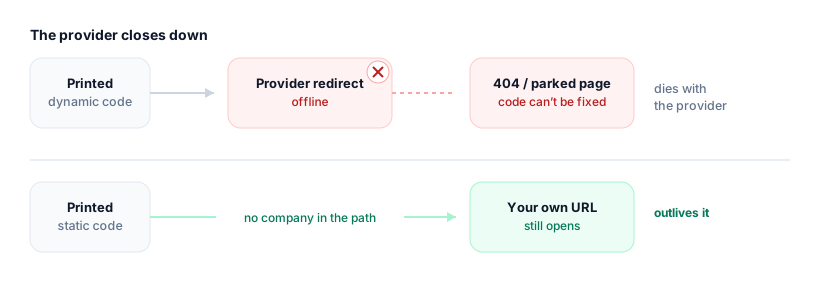
It comes down to one choice you made when you created the code. A dynamic code encodes a short link on the provider's domain, and every scan hits that link before being forwarded to your real destination. If the company shuts down, retires the product, lets its domain expire, or simply cancels your lapsed account, that redirect disappears and the printed pattern resolves to nothing — usually a 404 or a parked-domain page. The pattern cannot be corrected after printing, so a code on packaging, signage, or a book becomes permanently dead.
A static code encodes the destination straight into the pattern, with no redirect and no account, so there is nothing for a failed company to take down. It works for as long as the page it opens exists — and if that page is on a domain you own, its lifespan is entirely yours. Qrogo's free codes are static and do not phone home.
Why this is a real risk, not paranoia
QR platforms come and go. Plenty of once-popular generators have shut down, been acquired and retired, or moved their free codes behind a paywall. When that happens, anyone whose printed code depended on that company's servers is left with a code that scans to nothing. If you've put a code on packaging, signage, business cards, or a book, that's not a small problem.
Dynamic codes: tied to the provider's life
A dynamic code encodes a short link on the provider's domain. Every scan hits that link and gets redirected to your real destination. Convenient — until the redirect disappears. A dynamic code goes dark when:
- The company shuts down or discontinues the product.
- Your subscription lapses or the free trial ends.
- The provider's domain expires or their servers go offline.
At that point the printed pattern can't be fixed — it still points at a redirect that no longer exists, often landing on a 404 or a parked-domain page.
Static codes: no company in the loop
A static code encodes your destination straight into the pattern. There's no redirect and no account, so there's nothing for a failed company to take down. It works as long as the thing it points to exists — and if that's a URL on a domain you own, you're fully in control of its lifespan. (Related: do QR codes expire?)
What survives a shutdown, and what doesn't
| If this happens | Your dynamic code | Your static code |
|---|---|---|
| The provider shuts down | Dead — the redirect is gone | Unaffected |
| The product is sunset or acquired | Dead, or silently re-pointed | Unaffected |
| Your subscription lapses | Stops redirecting | Unaffected — there is no subscription |
| The provider’s domain expires | Lands on a parked page | Unaffected |
| Your own destination goes offline | Dead | Dead — this is the one risk you control |
How to print codes that outlive any provider
- Prefer static for permanent prints. Anything you can't easily reprint should encode a URL you control, not a provider's short link.
- If you need dynamic, own the domain. Point the redirect at a domain you control so you can rehost it if the tool disappears.
- Keep the destination alive. A static code is only as permanent as the page it opens — don't let that URL 404.
- Ask before you commit: is this code static or dynamic, and what happens to it if the company folds?
Where Qrogo fits
Qrogo's free codes are static and exported straight to you — they don't phone home and don't depend on Qrogo staying online. Hosted pages and dynamic codes are the editable option when you genuinely need to change a destination after printing, with the trade-off understood up front. The point is to make the durable choice the easy one.
Frequently asked questions
Will my QR code stop working if the generator shuts down?
Only if it's a dynamic code. Dynamic codes rely on the provider's redirect server, so they break if the company closes. Static codes encode the destination directly and keep working regardless of the provider.
Do dynamic QR codes depend on a third-party server?
Yes. A dynamic code points to a short link on the provider's domain that forwards to your destination. If that redirect goes offline — shutdown, unpaid plan, sunset product — the code lands nowhere.
How do I make a QR code that doesn't depend on a company staying alive?
Use a static code that encodes a URL on a domain you control. There's no redirect and no account in the loop, so no third party can take it down. Qrogo's free static codes work this way.
Can I recover a dynamic QR code after the provider closes?
Usually not — once the redirect is gone, the printed pattern can't be repointed. That's why permanent prints should be static, or dynamic only through a domain and export you control.