Do QR Codes Expire?
A QR code's black-and-white pattern never expires — it's just encoded data. A static QR code lasts forever because the destination is baked into the pattern with no server involved. A dynamic QR code keeps working only while the provider's redirect stays live and the subscription is paid.
By Chaara, Founder of Qrogo · Published July 25, 2026 · Updated September 20, 2026
The short answer
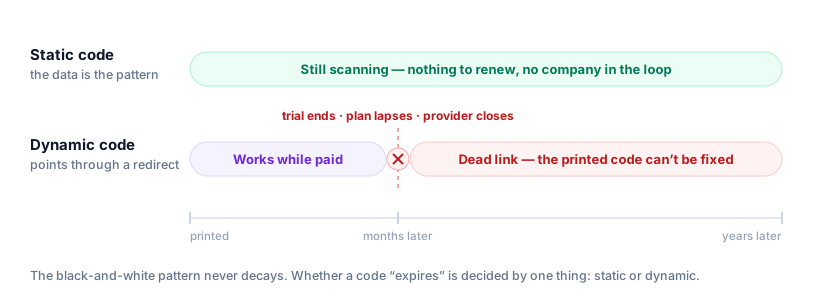
A QR code's pattern is just encoded data, so it never decays, rots, or times out. Whether a code stops working comes down to one thing: static or dynamic. A static code is the data — your URL, Wi-Fi details, or contact card are encoded straight into the pattern, with no server, account, or company in between — so it keeps working for as long as the destination exists. A dynamic code points to the data through a provider's redirect, so it lasts only while that redirect stays live and the subscription is paid.
This is where "free" QR codes catch people out. Many tools advertise free codes but quietly issue dynamic ones on a trial, which stop redirecting weeks later and turn a printed flyer into a dead link. Every code exported from Qrogo's free generator is static and permanent.
What actually makes a QR code stop working
| Static code | Dynamic code | |
|---|---|---|
| Where the destination lives | Encoded in the pattern itself | A short link on the provider’s domain |
| Stops working if… | The page it points to goes offline | The trial ends, the plan lapses, or the provider shuts down |
| Needs an account | No | Yes |
| Editable after printing | No | Yes |
| Lifespan you control | Yours, as long as the URL lives | The provider’s |
Why static QR codes never expire
With a static code, your URL, Wi-Fi details, or contact card are encoded straight into the pattern. Nothing sits between the scanner and your data — no redirect, no account, no company. So it keeps working for as long as the destination exists, offline and indefinitely. The only way a static code "stops working" is if the thing it points to goes away (for example, you take the linked website down).
Every code you export from the free Qrogo generator is static and permanent — no login, no expiry, no strings attached.
Why dynamic QR codes can stop working
A dynamic code encodes a short redirect link owned by the provider. When someone scans it, they hit that link first and get forwarded to your real destination. That redirect is useful — you can change the destination after printing and see scan analytics — but it means the code depends on a third party. A dynamic code dies if:
- The provider shuts the redirect off (trial ended, plan downgraded, unpaid invoice).
- The company goes out of business or sunsets the product.
- You close your account.
When that happens, the printed code doesn't just lose analytics — it becomes a dead link. (More on that in what happens if the company shuts down.)
The "free" catch to watch for
This is where people get burned. Many tools advertise "free QR codes," but quietly issue dynamic codes on a trial. The code scans fine while you're testing it — then stops redirecting a couple of weeks later unless you subscribe. If you've already printed it on a thousand flyers, that's an expensive lesson. Always check whether a "free" code is static (permanent) or dynamic (tied to the service).
Does the code from <your tool> expire? How to check in 30 seconds
People usually arrive at this question about one specific tool — QRCG, QR Code Gecko, GetQR, the code a Shopify app generated. Rather than trust a marketing page, you can answer it yourself for any provider, because it always comes down to the same two questions.
- What URL is actually in the code? Scan it with any app that shows the link before opening. If you see your own destination, the code is static and nothing can switch it off. If you see a short link on the provider's domain, it is dynamic and depends on them.
- If it's dynamic, what happens when you stop paying? Search their terms or pricing page for "expire", "trial" and "downgrade". The answer you want is what becomes of an existing printed code — some providers keep redirecting after a downgrade, some stop.
Question one is the decisive one and takes seconds. A static code cannot be expired by anybody, including the tool that made it, because there is nothing in the middle to turn off. That is also why the answer to "does it last forever?" is a property of the code type, not of the brand that generated it.
Worth checking before a reprint rather than after: if the code is dynamic and the provider disappears, the printed pattern cannot be corrected (see what happens if the company shuts down).
How to make a QR code that never expires
- Use a static code for anything permanent — a Wi-Fi password, a vCard, a fixed website URL.
- Keep the destination URL live and on a domain you control.
- Print with high contrast and a clear margin so it stays scannable for years.
- If you genuinely need to re-target the code later or want analytics, use a dynamic code — just understand the trade-off, and pick a provider whose codes keep working.
Login QR codes are a different thing
If you landed here after watching a WhatsApp Web code refresh every few seconds, that isn't the same kind of expiry. A login code — WhatsApp, a desktop app pairing, a banking confirmation — doesn't encode a destination at all. It encodes a one-time session request, and it cycles on purpose so a screenshot can't be reused to hijack the session.
Those codes are meant to die in seconds. Nothing about them predicts what happens to a code you generate and print, which is what the rest of this page is about.
Do QR codes wear out physically?
The data won't, but the print can. Scanning depends on a camera telling dark modules from light ones, so faded ink, sun bleaching, low contrast, glare from lamination, or a torn corner can all stop a code reading. QR codes include error correction that tolerates some damage — a code with a logo forces the highest level — but there's no substitute for a clean, high-contrast print.
Frequently asked questions
Do QR codes expire?
The QR pattern itself never expires — it's just encoded data. A static code lasts forever because the destination is baked into the pattern. A dynamic code keeps working only while the provider's redirect and your subscription stay active.
Do static QR codes expire?
No. A static code encodes the URL or text directly, with no server in between, so it works for as long as the destination it points to exists. There is nothing to renew and no account to keep.
Do free QR codes expire?
It depends on the type. Free static codes never expire. But many tools advertise 'free' while issuing dynamic codes that stop redirecting after a trial unless you pay — turning your printed code into a dead link. Always check which kind you're getting.
Does the QR code from my generator expire?
Check what URL is inside it. Scan it with an app that previews the link: if it shows your own destination the code is static and nobody can expire it, including the tool that made it. If it shows a short link on the provider's domain it's dynamic, and it lasts only as long as that provider keeps redirecting — check their terms for what happens after a trial or downgrade.
How long does a WhatsApp (or login) QR code take to expire?
Seconds to a minute, and that's by design — it's a different thing entirely. A WhatsApp Web or app-login QR encodes a one-time session request, not a destination, so it refreshes constantly to stop anyone reusing a screenshot. It says nothing about whether the QR codes you generate and print expire.
How long does a printed QR code last?
Indefinitely, as long as it stays readable. The data doesn't decay, but faded ink, low contrast, lamination glare, or physical damage can stop it scanning. Print with strong contrast and a quiet-zone margin, and higher error correction tolerates minor damage.