QR Code for a Pet ID Tag
Build a simple hosted page with your pet's name, your phone number and any medical notes, generate a QR code that opens it, and put the code on the collar tag. A finder scans it to reach you — no app, no monthly fee, and you can update your number without buying a new tag.
By Chaara, Founder of Qrogo · Published July 25, 2026 · Updated September 17, 2026
The short answer
Build a small hosted page with your pet's name, one or two phone numbers, any medical needs, and the microchip number, then generate a QR code that opens it and get that code onto the collar tag. A finder scans it with a phone camera and reaches you immediately — no app on either side. Leave your home address off: a finder only needs a way to contact you, and you decide exactly what shows.
Two things make this better than the alternatives. An engraved tag holds one phone number and becomes useless when that number changes; a subscription smart-tag keeps the page alive but bills you monthly and dies if the payment lapses. A plain QR code to a page you own gives you the flexibility with no recurring fee — change your number, your vet, or add a "we're travelling, call this instead" note, and the same tag shows it. Download a vector or high-resolution code so it stays crisp at tag size.
Why a QR tag, and why not a subscription one
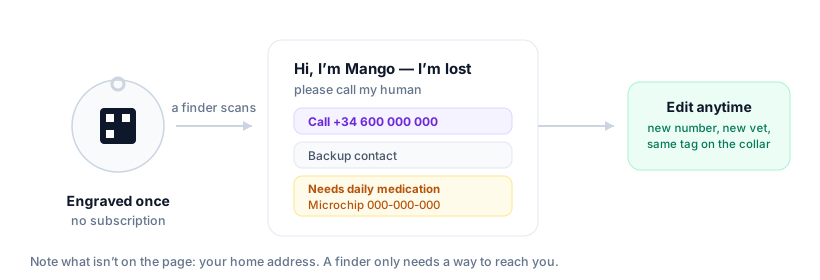
A regular engraved tag fits one phone number and nothing else — and if that number changes, the tag is useless. Smart-tag brands solve the flexibility problem but charge a monthly fee to keep the page alive, which quietly becomes another subscription that can lapse. A plain QR code to a page you own gives you the flexibility without the recurring bill.
| Engraved tag | Subscription smart tag | QR to your own page | |
|---|---|---|---|
| Change your phone number | Buy a new tag | Edit the page | Edit the page |
| Monthly cost | None | Recurring fee | None |
| What happens if payment lapses | Not applicable | The page goes dark | Not applicable |
| Medical notes and microchip | Won’t fit | Yes | Yes |
| Backup contact | Rarely fits | Yes | Yes |
| Who holds the data | Nobody | The vendor | You |
What to put on the page
- Pet's name and a friendly "Hi, I'm lost — please call my human" line.
- One or two phone numbers (yours plus a backup contact).
- Medical needs — allergies, medication, "needs daily meds" — which can be life-saving.
- Microchip number, if you have it.
Notice what's not there: your home address. A finder only needs a way to reach you, so you decide exactly what shows.
How to make it (free)
- Create a small hosted page (a contact or link page works well) with the details above. You can build it signed out and only sign in to publish.
- Generate a QR code pointing to the page.
- Get the code onto a tag — order an engraved/printed QR pet tag, or print a small waterproof label for the collar. Download a high-resolution or vector code so it stays crisp when shrunk to tag size.
The editable advantage
This is why a QR tag beats an engraved number. The code encodes a fixed page address, and you edit what's behind it. New phone number, new vet, a temporary "we're travelling, call this number instead" note — change the page and the same tag on your dog's collar shows it immediately. No re-engraving, no new tag. (More on why: do QR codes expire?)
Privacy matters here more than most places
A lost-pet tag is scanned by strangers, so you don't want a data broker in the middle harvesting who scanned it and where. Qrogo's hosted pages are self-hosted with no third-party trackers, and a finder sees only the details you chose to show — nothing more. Here's the privacy approach.
Frequently asked questions
How do I make a QR code for a pet tag?
Build a simple hosted page with your pet's name, your phone number, and any medical notes, then generate a QR code that opens it. Have the code engraved on or printed onto a tag for the collar. A finder scans it and sees how to reach you.
Is there a free pet ID QR code with no subscription?
Yes. Unlike smart-tag services that charge monthly, you can make the page and the QR code for free. The code points to a page you own and can edit, with no recurring fee to keep it working.
Can I change my phone number without buying a new tag?
Yes — that's the main advantage. The QR code points to a fixed page address, and you edit the page's contents. Update your number or vet details and the same engraved tag instantly shows the new info.
What should a lost-pet QR code show a finder?
Keep it to what helps reunite you: pet's name, a friendly 'I'm lost, please call' message, one or two contact numbers, and important medical needs. You choose exactly what's visible — no home address required.