Can Someone Track You Through a QR Code?
Not by scanning it. A QR code decodes on your phone, offline, and sends nothing on its own. Tracking only becomes possible once you open the link — then the destination website can log your IP-based approximate location, device, and time, but never your name or exact GPS unless you give it.
By Chaara, Founder of Qrogo · Published July 25, 2026 · Updated September 17, 2026
The short answer
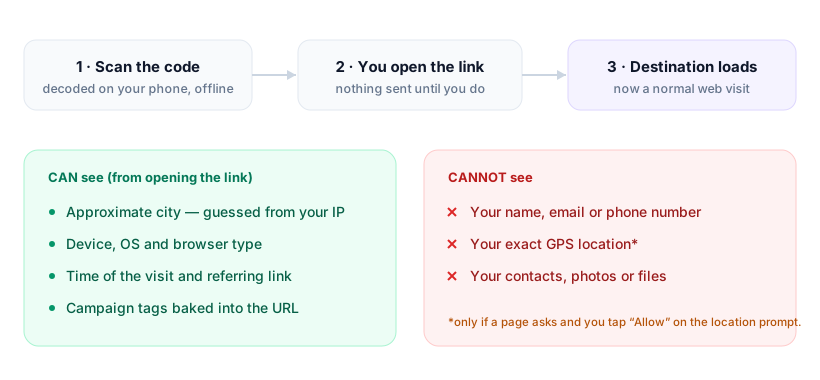
No one can track you by the act of scanning. Your camera decodes the pattern into text locally, offline — nothing is transmitted, and at that moment no one has learned anything about you. Tracking only becomes possible one step later, when you open what the code contains. From then on you are simply visiting a website, and that website can log what every web request reveals: an approximate city from your IP address (often wrong on cellular or a VPN), your device and browser, the time, and any campaign tags hidden in the URL.
What it cannot get is your identity, your exact GPS position, or anything on your phone. A dynamic code adds one more observer, because each scan passes through the provider's redirect first. Qrogo's static codes have no such middleman, and its dynamic analytics resolve to country only — no third-party trackers, no device fingerprinting.
Scanning happens on your device, offline
This is the part most explainers skip. When your camera reads a QR code, it decodes the pattern into text locally — no internet needed, nothing transmitted. The code is passive data, like a printed barcode. At that moment, no one has learned anything about you.
The tracking question really starts one step later: when you open what the code contains.
What the destination can see once you open it
Most QR codes hold a URL. The instant you open it, you're visiting a website — and any website you visit can log the ordinary things every web request reveals:
| What it can log | What it cannot get | |
|---|---|---|
| Location | An approximate city or region from your IP — often wrong on cellular or a VPN | Your street address or exact GPS, unless you tap Allow on a browser prompt |
| Identity | That some device visited, and which poster or table the URL was tagged for | Your name, email, or phone number |
| Device | Phone model class, operating system, and browser (the user agent) | Anything stored on the phone — contacts, photos, files |
| Timing | The moment of the visit and the referring link | Anything about you before or after that visit |
If the code is a dynamic code, it routes through the provider's server first, so that provider logs the scan too. See do QR code generators track you for how that layer works.
The one row worth dwelling on is location, because it is the source of almost every scare story about QR codes. Precise GPS is protected by the browser: a page has to ask, and you can decline. Full breakdown in does scanning a QR code reveal your location.
The honest catch: the tool in the middle
Here's what QR companies rarely say plainly: the ones that sell tracking make money from that scan data. A free dynamic-code provider typically logs geolocation, device, and referrer by default — because analytics is the product. A static code has no such middleman: the URL is encoded directly, so nothing routes through a third party at all.
That's the model Qrogo is built around. The designer runs entirely in your browser, static codes carry no tracking layer, and dynamic codes resolve analytics to country only — no third-party trackers, no device fingerprinting. Read the full privacy approach.
How to scan more safely
- Use a scanner that shows the URL first, and read it before opening.
- Be wary of a sticker placed over another code (a common scam tell).
- Don't enter passwords or card details on a page you reached from an unexpected code.
Frequently asked questions
Can someone track my location through a QR code?
Not precisely. Scanning shares no GPS. Once you open the link, the destination can estimate your city or region from your IP address — often inaccurate on mobile networks — and only gets exact GPS if you tap 'Allow' on a browser location prompt.
Can you tell who scanned a QR code?
No. A QR code can't capture your name, email, or phone number. A dynamic code's owner sees aggregate scan data — counts, rough location, device type, time — not your identity, unless the page you land on asks you to fill something in.
Do QR codes contain viruses or tracking?
The code itself is just encoded text and holds no software. Any risk comes from the destination it opens — a malicious or tracking-heavy website — not from scanning the pattern. Preview the URL before opening if your scanner shows it.
How do I scan a QR code without being tracked?
Check the URL preview before opening, avoid entering personal details on the page, and prefer codes from privacy-first providers. Qrogo records country only for dynamic codes and adds no third-party trackers or fingerprinting.