Does Scanning a QR Code Reveal Your Location?
No — scanning shares no GPS and sends nothing on its own. Once you open the link, the website can estimate your city from your IP address, which is coarse and often wrong. It only gets your precise location if it asks with a browser prompt and you tap Allow.
By Chaara, Founder of Qrogo · Published July 25, 2026 · Updated September 19, 2026
The short answer
Scanning reveals no location at all. The pattern is decoded on your own device, offline, and sends nothing. Almost all the confusion here comes from mixing up two things that sound alike: IP-based location and GPS location. Once you open the link a code contains, your request carries your IP address, and the site can look it up to guess where you are — city or region at best, pointing at your carrier's gateway on mobile data, and somewhere else entirely behind a VPN. That guess is what QR scan analytics report.
Precise GPS is different: it is protected by the browser. A page has to request it, your phone shows a permission prompt, and it gets nothing unless you tap Allow. No QR code can bypass that prompt or read GPS silently. Qrogo goes coarser still — dynamic-code analytics resolve to country only, with no coordinates stored.
Two very different kinds of "location"
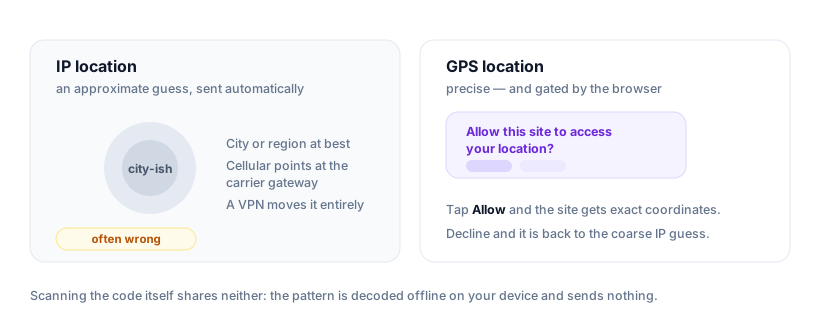
Almost all the confusion here comes from mixing up two things that sound the same but aren't: IP-based location (a rough guess) and GPS location (precise coordinates). A QR code can lead to the first by accident and the second only with your explicit permission.
IP location: an approximate guess
When you open the link a code contains, your device makes a web request, and every request carries your IP address. A website can look that IP up to guess where you are — but the result is approximate and unreliable:
- It usually resolves to a city or region, not a street or building.
- On mobile data it often points to your carrier's gateway, which can be a different city.
- A VPN or proxy relocates it entirely.
This is the "location" that QR scan analytics use. It's good enough to say "most scans came from Berlin," not "this person is at 12 Oak Street."
GPS location: only with a prompt you accept
Your precise GPS position is protected by the browser. A page can request it, but your phone shows a permission prompt — "Allow this site to access your location?" — and it gets nothing unless you tap Allow. No QR code can bypass that prompt or grab GPS silently. Decline it and the site is back to the coarse IP guess.
So what does a QR code actually reveal?
| Step | What the site learns | How precise |
|---|---|---|
| You scan the code | Nothing — the pattern is decoded offline on your device | No location at all |
| You open the link | An IP-based guess, automatically | City or region, and frequently wrong |
| You tap Allow on the prompt | Your actual GPS position | Exact — and entirely your choice |
For the full picture of everything a destination can log — device, time, campaign tags — see can someone track you through a QR code.
What about your phone number?
This comes up almost as often as location, and the answer is cleaner: your phone number isn't part of a web request at all. It isn't in your IP address, your browser or your device profile, so a website you reach from a QR code has nothing to read it from.
There are only two ways a scan leads to someone learning it, and both need you:
- You type it in. The page asks for a phone number and you fill the form — the same as on any website.
- You send a prepared message. A QR code can hold an
sms:or WhatsApp link that opens your messaging app with the recipient and text already filled in. Nothing is sent until you press send — but if you do, the recipient sees your number, because that is how messaging works.
So a plain link code can't reveal it, and a message code only reveals it if you choose to send. As always, read the preview before opening, and don't send a pre-written message you didn't intend to.
The privacy-first version
Not every provider needs to know where scans come from at street level, and Qrogo doesn't. Dynamic-code analytics resolve to country only, with no precise coordinates, no third-party trackers, and no fingerprinting. If you're making a code for a poster or a menu, you can see roughly which countries scan it without ever handling anyone's exact location. Here's the full privacy approach.
Frequently asked questions
Does scanning a QR code share my GPS location?
No. Scanning transmits nothing, and opening the link gives no GPS. A website only gets precise GPS if it asks with a browser location prompt and you tap Allow — which you can decline.
Can a website see my location when I scan its QR code?
It can estimate it from your IP address — typically city or region, and often inaccurate on mobile networks or a VPN. That's an educated guess, not your exact position.
How accurate is IP-based location?
City-level at best, and frequently off by miles. On cellular it can resolve to your carrier's gateway city rather than where you actually are; a VPN moves it somewhere else entirely.
Does scanning a QR code reveal your phone number?
No. A phone number isn't part of a web request, so scanning a code and opening the link cannot expose it. The only ways a destination learns your number are if you type it into a form, or if the code opens a pre-filled SMS or WhatsApp message and you press send — both of which need an action from you.
How do QR code scan analytics know location then?
They map the IP address of each scan to an approximate area. Privacy-first providers deliberately keep it coarse — Qrogo resolves scans to country only and stores no precise coordinates.