Do QR Code Generators Track You?
Some do, some can't. A static code encodes your URL directly and has no tracking layer. A dynamic code routes each scan through the provider's server, which logs location, device, and time by default. The generator's own website may also track you as you use it — a separate question worth checking.
By Chaara, Founder of Qrogo · Published July 25, 2026 · Updated September 17, 2026
The short answer
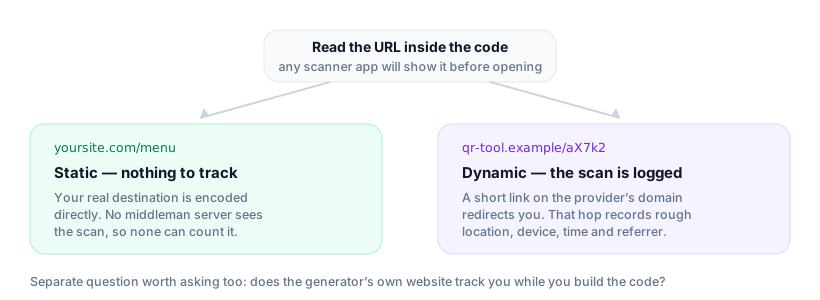
Some do and some structurally cannot, and the question splits in two. First, the generator website: like most sites it may run its own analytics, ads, or third-party scripts while you build a code. Second, and more important after you print, the code it issues. A static code encodes your real destination directly, so scanners go straight to your URL and nothing passes through the generator — there is no middleman left to count or locate the scan. A dynamic code encodes a short link on the provider's domain that redirects, and that hop is exactly where tracking happens.
To check which you have, read the URL inside the code: your own link means static and untracked, a short code on the tool's domain means dynamic and logged. Qrogo builds codes in your browser, ships static codes with no redirect, and keeps dynamic analytics at country only.
There are two separate tracking layers
"Does it track me?" actually splits into two questions, and mixing them up is why the answers online are so muddy:
- The generator website — the site where you build the code. Like most sites, it may run its own analytics, ads, or third-party scripts while you're on it.
- The code it issues — whether the finished QR code reports back every time someone else scans it.
The second one is what matters after you print, and it comes down to static vs dynamic.
Static codes: no tracking layer
A static code encodes your real destination straight into the pattern. When someone scans it, they go directly to your URL — nothing passes through the generator's servers, so the generator can't count or locate the scan. There is simply no middleman to do the tracking.
Dynamic codes: tracking is the point
A dynamic code encodes a short link on the provider's domain that redirects to your destination. That redirect hop is exactly where tracking happens: the provider records the scan and can log approximate location, device and browser, time, and referrer. For many "free" tools this is the business model — the analytics dashboard is what they're selling, and your scanners' data is the raw material.
What each kind can log
| Static code | Dynamic code | |
|---|---|---|
| URL encoded in the code | Your real destination | A short link on the provider’s domain |
| Who sees the scan | Only the site you actually opened | The provider first, then that site |
| Scan count | Impossible — nothing to count it | Recorded on every scan |
| Approximate location | Not available to the generator | Logged by default at most providers |
| Device, browser, referrer | Not available to the generator | Logged by default at most providers |
| Qrogo’s version | No redirect, no tracking layer | Country only — no coordinates, no fingerprinting |
How to tell which kind you have
- Look at the encoded URL. If it's your actual link, it's static and untracked. If it's a short code on the generator's domain, it's dynamic.
- Watch the redirect. Scan it and see if you briefly pass through another domain before landing — that hop is the tracking step.
- Read the privacy policy. Search it for "IP address," "location," and "third parties." If they share data with ad networks, that tells you a lot.
Does the person scanning know they're being counted?
Almost never, and that's worth saying plainly. A tracked code looks exactly like an untracked one — same pattern, same black squares — and the redirect resolves in milliseconds, so the provider's domain flashes past faster than anyone reads it. No prompt appears, no permission is asked.
The only tell is the URL preview a good scanner shows before opening. If it reads as a short code on a QR company's domain rather than the destination you expected, the scan is being recorded. That is the whole disclosure — which is why it matters what the code's owner chose to use.
What "privacy-first" actually means
It's not a slogan you can take at face value — it should map to concrete choices. For Qrogo it means:
- The designer runs in your browser — for a static code, your design never leaves the page.
- Static codes carry no redirect and no tracking layer.
- Dynamic-code analytics resolve to country only — no precise location, no device fingerprinting, no third-party trackers.
That's the honest version most tracking-funded tools can't offer, because it would remove the thing they sell. Full details on the privacy page.
Frequently asked questions
Do free QR code generators track scans?
Dynamic ones usually do — routing each scan through their server lets them log location, device, and time by default, because analytics is the paid product. Static codes have no tracking layer at all.
How can I tell if my QR code is tracked?
Check whether the code is static or dynamic. If the encoded URL is your real destination, it's static and untracked. If it's a short link on the generator's domain that redirects, it's dynamic and the provider logs the scan.
If a QR code has scan tracking, does the person scanning know?
Usually not. A dynamic code looks identical to a static one, and the redirect happens in milliseconds — most people never see the intermediate domain. The one tell is the URL preview before opening: a short link on a QR provider's domain means the scan is being counted. Nothing warns them beyond that.
Which QR code generator is privacy-first?
Look for a client-side designer, static codes with no redirect, and analytics that stay coarse. Qrogo builds codes in your browser, adds no third-party trackers, and resolves dynamic-code analytics to country only.
Does the QR generator website itself track me?
It can — like any site, it may run its own analytics or ads while you use it. That's separate from whether the code tracks scanners. Qrogo's generator runs client-side and your design never leaves the browser for a static code.