
QR Code on a Resume or CV: Where to Put It and What to Link
Put one QR code in the top corner or footer, sized at least 2 cm square, linking to a portfolio, digital vCard, or link-in-bio page — not a bare document URL. Always print the destination as a text link too, so the information survives even if a recruiter doesn't scan.
By Chaara, Founder of Qrogo · Published July 25, 2026 · Updated September 20, 2026
The short answer
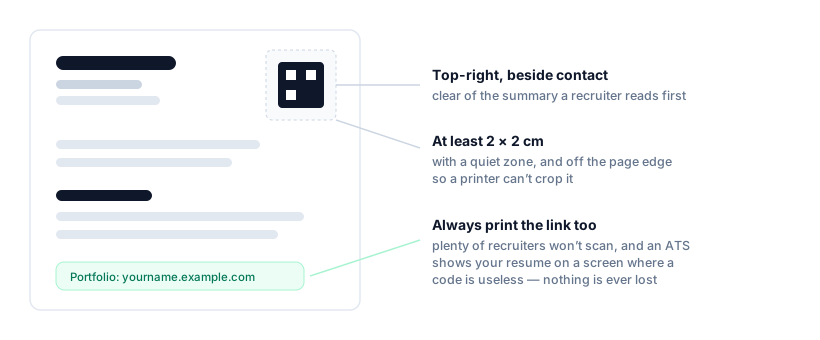
Put one QR code in the top-right corner beside your contact block, or centered in the footer, and keep it at least 2 × 2 cm on a printed A4 or Letter page. Leave a few millimetres of white space around it so scanners can lock on, and keep it off the page edge so a printer can't crop it. Point it at something a flat page cannot show — a portfolio, a digital vCard, or a link-in-bio page that ties your work, profile, and contact details together — never at a raw file URL that might move.
The rule that separates a useful resume QR from a gimmick: it must degrade gracefully. Plenty of recruiters will not scan, and applicant-tracking systems show your resume on a screen where a code is useless. So always print the destination as an ordinary text link right beside it. Use a static, permanent code, since a job hunt can run for months.
What to link (this is the part people get wrong)
A QR code is only worth the space if it opens something a flat page can't show. Don't point it at a raw file URL that might move — point it at a small hub you control:
- Portfolio or work samples — the strongest choice for designers, developers, writers.
- A digital vCard so they can save your contact in one tap — make one with the vCard generator.
- LinkedIn, if that's your most complete profile.
- A link-in-bio page that ties portfolio, LinkedIn, and contact together — build one as a hosted page so a single code covers everything.
| Link it to | Best for | Why it works |
|---|---|---|
| Portfolio or work samples | Designers, developers, writers, architects | Shows the work itself, which a page of bullet points can’t |
| A digital vCard | Sales, consulting, anyone networking in person | Saves your details to their phone in one tap |
| Corporate roles where it’s your fullest profile | Recruiters already know how to read it | |
| A link-in-bio page | Anyone with more than one thing to show | One code covers portfolio, profile and contact at once |
| A raw file URL | Nothing — avoid this | File links move or expire, and the code can’t be corrected after printing |
Should the QR code go to your LinkedIn?
Often yes — but only if LinkedIn is genuinely your most complete profile. It's the right target when your track record is the selling point and there's nothing to show visually: recruiters already know how to read it, it's kept current without you touching the resume, and it carries recommendations a PDF can't.
It's the wrong target if you have work to show. A designer, developer, writer or photographer sending a recruiter to a profile page instead of the portfolio has spent the scan on the weaker asset.
Two practical notes. Use your custom LinkedIn URL(linkedin.com/in/yourname, set it in your profile settings) rather than the default one full of digits — it's what you'll print as the text fallback beside the code. And if you want LinkedIn and a portfolio and your contact details from one code, don't pick: point it at a link-in-bio page that holds all three, which also means you can change any of them without reprinting.
QR code or plain link?
Do both, in that order. Print the URL as normal text and put the code beside it. On paper the code saves a recruiter typing; on a screen — which is how most applicant-tracking systems display your resume — the code can't be scanned at all and the link is what works. Choosing one means being wrong half the time, and the two together cost a single line.
Where to place it
Top-right corner beside your contact block, or centered in the footer. Keep it clear of the summary and first job entry — the text a recruiter reads in the first six seconds. Leave a few millimetres of white space around it (the "quiet zone") or scanners struggle, and keep it away from the page edge so a printer can't crop it.
What size to make it
Aim for at least 2 x 2 cm (~0.8 inch) on a printed A4 or Letter page. Smaller than that and phones fumble it, especially older cameras. Download as a crisp vector or high-resolution file so it stays sharp in print, and test-scan the actual printout, not the screen.
The fallback that makes it professional
Here's the rule that separates a smart resume QR from a gimmicky one: it must degrade gracefully. Some recruiters will scan it, plenty won't, and many applicant-tracking systems display your resume on a screen where a code is useless. So always print the destination as a normal text link right next to the code (for example, "Portfolio: yourname.example.com"). Then nothing is ever lost.
Make it free — and make it last
A job hunt can run for months, and you might reuse the same printed resume at a career fair a year later, so you want a code that never expires and costs nothing. Qrogo's free codes are static and permanent — no account needed just to generate one, and no risk of it lapsing mid-search. If you link a hosted page, you can also update that page's contents later without changing the printed code.
Frequently asked questions
Where do I put a QR code on my resume?
Top corner next to your contact details, or the footer. Keep it out of the way of the text a recruiter skims first, and never place it where a printer might crop it. One code is plenty — more looks cluttered.
What should a resume QR code link to?
A single destination that adds value beyond the page: a portfolio, a digital vCard, a LinkedIn profile, or a link-in-bio page tying them together. Avoid linking a bare document URL that could move or expire.
Should I put my LinkedIn as a QR code or a plain link on my resume?
Print the link, and add the QR code only if you have room. On a paper resume the code saves typing; on a screen — which is how most applicant-tracking systems show it — a code is useless while a link is clickable. Doing both costs one line and works in either case.
Should I put a LinkedIn QR code on my CV?
Only if LinkedIn is your most complete profile — it works well when your track record is the selling point. If you have work to show, point the code at a portfolio instead. Use your custom linkedin.com/in/yourname URL, and print it as text beside the code so it still works unscanned.
How big should a QR code be on a resume?
At least 2 x 2 cm (about 0.8 inch) so a phone reads it comfortably from a printed page, with a small clear margin around it. Test the actual print, not just the screen.
Is a QR code on a resume a good idea?
Yes, if it degrades gracefully. Some recruiters scan, many won't, and some systems view resumes on-screen. Always print the destination as a normal text link too, so nothing is lost if the code isn't scanned.