
How to Create a Wi-Fi QR Code
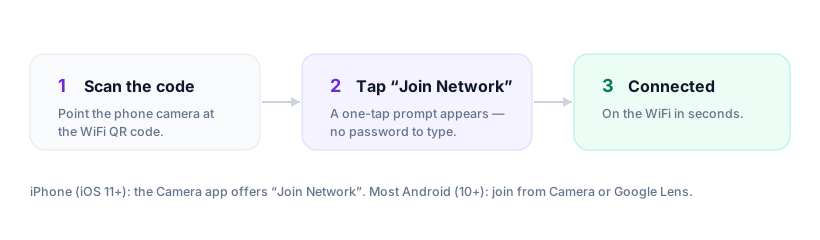
To make a Wi-Fi QR code, enter your network name (SSID), password and security type into a generator, then download the code and display it where guests sit. Scanning it shows a one-tap prompt to join — no password typing. The whole process takes under a minute; you can do it right here.
By Chaara, Founder of Qrogo · Published June 20, 2026 · Updated September 17, 2026
The short answer
To make a Wi-Fi QR code, enter your exact network name (SSID), the password, and the security type — usually WPA/WPA2 — into a generator, then download the code and display it where guests sit. Scanning it with the phone camera brings up a one-tap prompt to join, so nobody types a password. The whole process takes under a minute and needs no account, because a Wi-Fi code is static: the credentials are encoded into the pattern itself and it works offline.
Four things make these codes fail, and all four are avoidable: a security type that doesn't match your router, a mistyped or wrong-case SSID, a code printed too small or on a busy background, and unescaped special characters in the password. A good generator handles the escaping for you. Because the password is baked in, rotating it means generating a fresh code.
Step by step
- Find your exact network name (SSID). Copy it from your router or phone's Wi-Fi settings — capitalisation matters.
- Enter the password and choose the security type. Pick WPA/WPA2 unless you have a reason not to.
- Generate and download. Use PNG for printing or SVG for signage that needs to scale.
- Test before you print a batch. Open your phone camera, point it at the code, and confirm the join prompt appears.
- Display it well. Put it where people sit — table tent, fridge, welcome card — with a short "Scan to join Wi-Fi" label.
The four reasons a Wi-Fi QR code won't scan
| Cause | What you see | Fix |
|---|---|---|
| Wrong security type | The join fails silently — the most common cause by far | Match the code to the router exactly: WPA/WPA2, WEP, or open |
| SSID typo or wrong case | The phone looks for a network that doesn’t exist | Copy-paste the SSID instead of retyping — “HomeWiFi” and “homewifi” are different networks |
| Printed too small or low-contrast | The camera never locks onto the pattern | At least 2 × 2 cm, dark on light, quiet space around it, never over a busy photo |
| Special characters in the password | The code scans but the credentials are wrong | Semicolons, commas, colons and backslashes must be escaped — Qrogo does this automatically |
A note on changing passwords
A Wi-Fi QR code is static: the password is baked in. If you rotate your password regularly, you'll regenerate the code each time. For more on that trade-off, see static vs dynamic QR codes.
Frequently asked questions
Do I need an app to scan a Wi-Fi QR code?
No. iPhone (iOS 11+) and Android (10+) recognise Wi-Fi codes in the native camera and show a 'Join network' prompt. Older phones may need a QR scanner app.
Can guests see my password from the code?
Technically the password is encoded in the code, so anyone who scans it can join. Display it only where you'd already share the password, and don't post it publicly online.
Why does my Wi-Fi QR code say 'unable to join'?
Almost always a mismatch in the security type (WPA vs WEP) or a typo in the SSID (it's case-sensitive). Re-check both and regenerate.